
AI Workflow Automation Tools Compared Without Regret
AI workflow automation tools are everywhere right now, and that is exactly why choosing one feels harder than it should. If you are trying to reduce repetitive work across Slack, email, CRM, docs, tickets, forms, and internal systems, the real problem is not finding a tool. It is avoiding the wrong one: too simple for the workflows you actually run, or so complex that your team never gets past the pilot. The marketing makes every tool sound like the fix, but the real fix is the one your team doesn’t resent using.
I have seen teams buy into polished “AI can automate everything” messaging, then get stuck debugging brittle steps at 5:30 PM while ops requests pile up. This guide gives you a practical comparison, a shortlist by team type, and a decision framework you can use before budget disappears into another software line item. A decision framework is only as good as the budget it protects.
What Actually Counts as an AI Workflow Automation Tool?
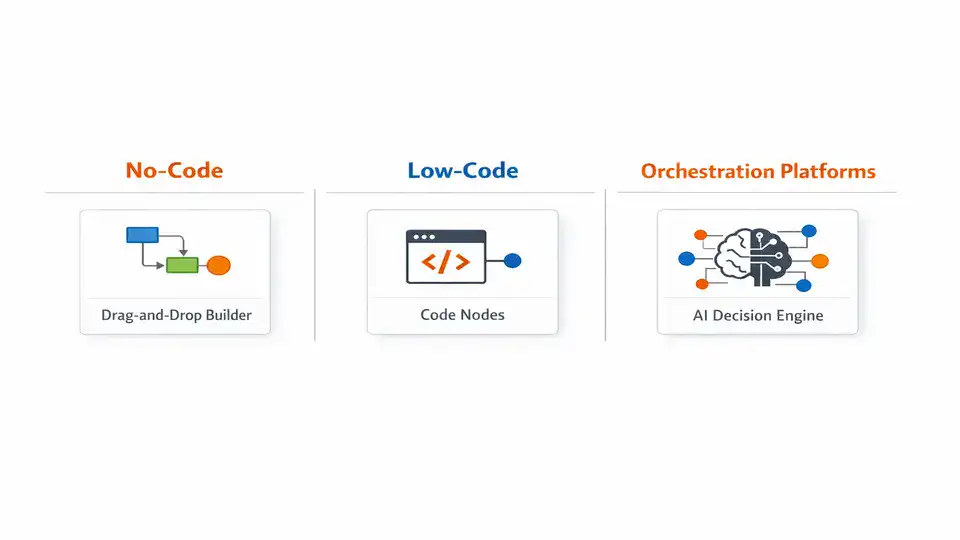
If you need the shortest possible shortlist, here it is. Small teams should usually start with no-code AI automation software for business workflows such as Slack’s roundup of popular automation tools points toward: platforms with broad integrations and fast setup. Growing operations teams often do better with hybrid or low-code tools like n8n, where you can add logic, retries, and custom nodes without building everything from scratch. Technical teams or AI product teams may want orchestration-first platforms like Vellum when prompt chains, evaluations, and model routing are central to the workflow.
The simple segmentation looks like this: Zapier, Make, Gumloop for no-code AI workflow automation; n8n for low-code flexibility; Vellum and custom orchestration stacks for more advanced AI workflow orchestration tools. “Best” is not a universal label here. It changes fast depending on whether you are triaging support tickets, enriching leads, processing invoices, or routing internal approvals.
Why the Wrong Level of Automation Creates More Work
Teams now run across a messy stack of SaaS tools: CRM, help desk, docs, chat, billing, project management, forms, and analytics. Traditional automation handled triggers and handoffs. AI adds judgment layers: classify this request, summarize that thread, extract fields from a PDF, draft a reply, decide which queue gets the task. That is why AI tools for task automation feel so appealing. They promise fewer clicks and faster throughput. But the line between automation and AI can blur — traditional robotic process automation (RPA) follows predefined workflows, while AI agents add decision-making on top. The promise of fewer clicks often hides the work of deciding which clicks to automate.
But there is a catch. AI workflows still require maintenance and can fail silently at edge cases. That is the honest downside many buyers only discover after launch. A support triage flow may work beautifully on 80% of tickets, then misroute the 20% that contain vague language, screenshots, or mixed intents. I have watched one “fully automated” intake process save hours for a week, then quietly create a backlog because one app changed a field name and nobody noticed until customers started asking why nothing moved.
Choosing the right level matters because inefficiency is expensive in boring ways: duplicate data entry, delayed approvals, inconsistent responses, and operators spending 15 minutes chasing context across five tabs. At the same time, automating a broken process just makes the mess travel faster. If your steps are undocumented, exceptions are constant, or ownership is fuzzy, AI process automation tools will expose that weakness rather than fix it.
The Fast-Scan Table: What You’re Really Signing Up For
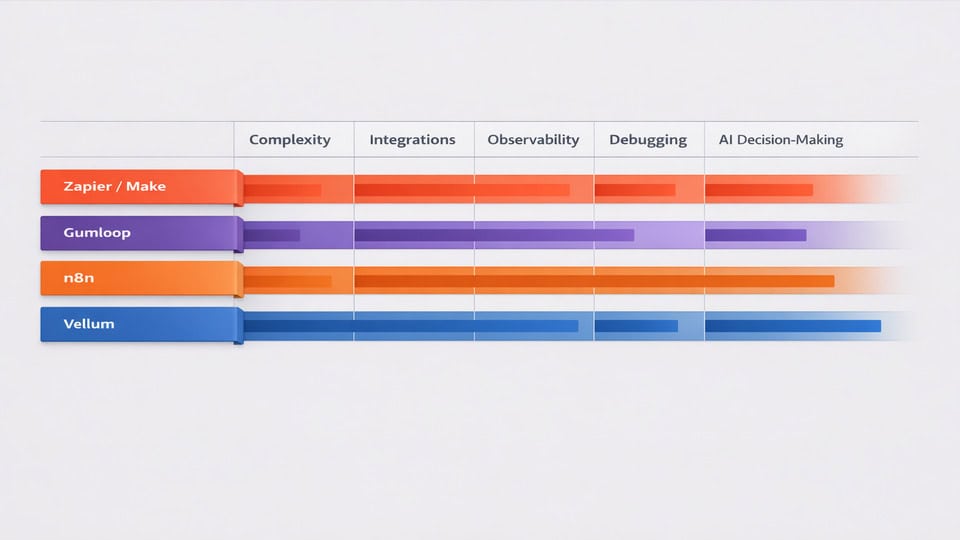
| Tool type | Best for | Technical level | AI capabilities | Integration depth | Pricing model |
|---|---|---|---|---|---|
| Zapier / Make | Fast app-to-app automation for small teams | Low | Basic generation, summarization, routing, simple AI steps | Broad connector ecosystem | Usually task or operation based |
| Gumloop | AI-first no-code workflows and web/data tasks | Low | Strong AI blocks for extraction, generation, agent-like flows | Moderate and growing | Credit or usage based |
| n8n | Growing ops teams needing control and custom logic | Medium | Flexible LLM steps, branching, custom code, agents | Deep, especially with self-hosting or custom nodes | Seat, execution, or self-host infrastructure |
| Vellum | AI-native workflows where prompt quality and evaluation matter | Medium to high | Prompt orchestration, testing, evaluations, model routing | Focused more on AI logic than broad app connectors | Platform pricing plus model/API usage |
The trade-off is pretty consistent: simplicity buys speed, while control buys resilience. If your workflows are linear and repetitive, no-code often wins. If your workflows branch, fail, or need auditability, the extra complexity of low-code may save you pain later. What looks like extra complexity upfront often turns into saved time on the first failure.
Where the Best AI Workflow Automation Tools Really Differ
No-code AI workflow automation tools
Platforms like Zapier, Make, and Gumloop are attractive because setup can happen in hours, not weeks. For a small team, that matters. You can connect form submissions to Slack alerts, summarize emails, enrich leads, or route simple requests without asking engineering for help. In my experience, this is where most teams should start if they’re still proving the value of automation. The real bottleneck here isn’t the tool—it’s figuring out which workflows are worth the time to connect.
The limitations show up when workflows become conditional, exception-heavy, or expensive at scale. Debugging is often less pleasant than the homepage demo suggests. You may see a failed run, but not always the deeper reason a step broke. Pricing can also creep up fast if every branch, retry, and AI call counts as another task or operation.
Low-code and flexible orchestration tools
n8n sits in a useful middle ground. It is not as instantly friendly as pure no-code tools, but it gives you more control over branching, retries, custom code, webhooks, and infrastructure choices. That makes it one of the stronger AI-powered workflow management tools for operations teams that have outgrown simple zaps but do not want a full custom stack.
There is a learning curve. Someone on the team needs enough technical confidence to understand payloads, API behavior, and execution logs. Still, that investment often pays off in reliability and transparency. Integration reliability varies depending on API limits and app stability, not just the automation platform itself. That is a detail buyers underestimate all the time.
AI-native orchestration platforms
Tools like Vellum are different from broad workflow builders. They are built for the AI layer itself: prompt versioning, evaluation, model routing, testing, and more structured orchestration around LLM behavior. If your workflow depends on nuanced classification, response quality, or multiple model steps, that focus is valuable.
But these are not always the best AI automation platforms comparison winners for general business ops. If your main need is “move data between apps and add a little AI,” an orchestration-first platform may be overkill. I made that mistake once in an evaluation project: we got excited by the AI controls and ignored the day-to-day integration work. The result was elegant prompt logic sitting on top of an awkward operational process.
Practical Warnings Before You Spend Money
Start with a workflow that already works manually before automating it.
Do not choose only from flashy AI features.
Look at debugging, logs, review paths, and version control.
Common mistake number one: buying from a feature checklist. A tool can have document extraction, summarization, agents, and hundreds of connectors and still be wrong for your team if nobody can maintain it. Common mistake number two: assuming AI outputs are “good enough” because early tests looked impressive. They often are not. Prompt tuning, field mapping, and exception handling are where time disappears. This is the kind of advice you only appreciate after you’ve burned a sprint on a tool that looked perfect on paper.
Validate outputs before you scale. For example, if you automate support classification, manually review the first 100 to 200 items. If you automate invoice extraction, compare extracted fields against actual records for at least two weeks. That sounds tedious, but it is cheaper than fixing downstream errors in finance or customer support.
Also watch the pricing traps. No-code platforms may charge by tasks or operations. AI-native tools may add model costs on top. Low-code tools may look cheaper until you count internal maintenance time or hosting. A realistic monthly range for a small team pilot can be roughly $50 to $300; a more serious ops setup with higher volume, premium connectors, and model usage can move into $500 to $2,000+ surprisingly fast.
Then there is privacy. If the workflow touches contracts, HR records, customer tickets, or regulated data, review retention settings, model usage policies, and vendor lock-in risk before you build too much around one platform. The lock-in risk is the one thing templates won’t solve for you.
Which Option Fits Your Team Without Overbuying?
For solo operators and small teams: choose no-code AI workflow automation if your workflows are mostly linear. Think lead routing, meeting note summaries, content handoffs, simple intake triage, or moving data between a few SaaS tools. You want speed, templates, and broad integrations more than deep orchestration. It rewards the team that values speed over control.
For mid-sized ops teams: look at hybrid or low-code tools when workflows include approvals, retries, branching, or custom business rules. This is where n8n often makes sense. You get more control without requiring a full engineering project.
For enterprise or AI-heavy teams: AI workflow orchestration tools or custom stacks make more sense when governance, evaluation, observability, and model routing are core requirements. This is especially true if workflows touch customer-facing outputs or regulated processes.
This is ideal for you if you have repeatable digital work, clear inputs and outputs, and someone who can own the workflow after launch. You might want to skip this for now if your process changes weekly, exceptions are constant, or nobody can document the current state. In that case, fix the process first.
Fit beats hype every single time. The best AI workflow automation tools are the ones your team can actually run, debug, and trust on a Tuesday afternoon when things go wrong.
If you want broader productivity context before choosing, this related guide on AI tools for digital productivity is a useful companion read.
A Simple Shortlist Process That Keeps You Out of Trouble
| Step | What to do | What to measure |
|---|---|---|
| Identify workflows | Pick 1-2 repetitive processes with clear triggers | Volume per week, time spent manually |
| Define inputs/outputs | List source apps, fields, decisions, and final actions | Missing data, exception rate |
| Set review level | Choose full automation, approval step, or spot checks | Error tolerance, compliance needs |
| Shortlist tools | Compare 2-3 platforms only | Setup time, connector fit, AI quality |
| Run pilot | Use live data for 2 weeks | Success rate, review workload, failures |
| Scale gradually | Add one branch or use case at a time | Cost per run, maintenance effort, confidence |
My rule is simple: if a pilot does not save measurable time within 14 days, I do not trust the annual contract pitch. Test first, then expand.
Related TheLife Nexus Guides
- AI tools for digital productivity — compare this before committing to an automation stack.
- AI & Digital Productivity — explore more AI productivity and workflow strategy guides.
- Remote Work & Setup — useful if your automation project supports distributed teams.
- Smart Home & Wearables — for broader connected tech and automation context.
Frequently Asked Questions
Are AI workflow tools reliable enough for business-critical work?
They can be, but only with the right guardrails. For critical workflows, use retries, logging, fallback paths, and human review on sensitive steps. Reliability depends on the platform, your app integrations, API stability, and how much variation exists in the incoming data. For many teams, semi-automated is the safer starting point.
How much do AI workflow automation tools cost long-term?
Long-term cost is usually a mix of platform fees, usage fees, AI model costs, and maintenance time. A small pilot might stay under $300 per month. Once volume grows, connectors multiply, and AI calls increase, costs can move into the low thousands. Always estimate cost per workflow run, not just sticker price.
Do these tools replace human operators?
Usually they reduce repetitive work rather than replace judgment-heavy roles. Good automation removes copy-paste tasks, triage, formatting, and routine routing. People still matter for exception handling, approvals, customer nuance, and process improvement. The strongest setups use human-in-the-loop review where mistakes would be expensive.
What about compliance and data security?
Check where data is stored, whether prompts or payloads are retained, what model providers are involved, and whether self-hosting is available. If you handle regulated or confidential data, involve security early. This is one reason some teams prefer low-code or self-hosted options over purely hosted no-code tools.
Official and External Resources
Choose the Tool Your Team Can Actually Live With
The smartest way to evaluate AI workflow automation tools isn’t to chase the platform with the longest feature page. It’s to match the tool to your team’s skill level, your workflow complexity, and your tolerance for maintenance. No-code often works for small teams. Low-code wins when branching and control matter. AI-native orchestration platforms shine when model behavior itself is central to the workflow. The maintenance tolerance threshold tends to reveal itself around the third workflow revision.
The best system is the one that keeps working after the demo glow wears off. Start small, validate outputs, keep humans in the loop where needed, and scale only after you can trust the workflow in real conditions. What looks like a polished demo often hides the edge cases that only show up under real traffic.
Your Next Move: Compare 2-3 Tools, Then Run a Pilot
If you are narrowing options this week, pick one workflow, shortlist two or three platforms, and test them with real data for 14 days. That will tell you more than any feature matrix. For additional context, review the official perspectives from Slack, n8n, and Vellum, then pressure-test what actually fits your team.