Smart Home Setup Guide for Beginners: Start Small and Avoid Costly Mistakes
Smart home setup guide for beginners starts with one simple truth: you do not need a house full of gadgets to get real value. You need a system. Start with a single hub or platform that ties your devices together, so every bulb, plug, and speaker responds in one app instead of five. A single smart plug on a reliable system beats a dozen orphan gadgets every time.
When I first started, I bought a random smart bulb on sale, then a different-brand plug, then a speaker that worked with some devices but not others. The result was exactly what beginners fear: too many apps, flaky routines, and money spent on things that looked clever in the box but felt annoying in daily life. The practical lesson: compatibility matters more than the sale price.
Search Intent
This guide is for people who want to learn how to set up a smart home without wasting money, buying incompatible devices, or creating a confusing app mess. You will learn which ecosystem to choose first, what beginner devices actually make sense, and how to expand safely.
If you already know you want plug-based automation, read this companion guide on best smart plugs for home automation before buying your first bundle.
Why Planning First Saves Money and Frustration
The hardest part of a first smart home is not installation. It is fragmentation. Different devices use different apps, voice assistants, and wireless protocols. Some work over Wi-Fi, some need a hub, some support Matter, and some still lock you into their own ecosystem.
I learned this the annoying way. I bought mixed-brand devices before choosing an ecosystem, assuming they would all “just connect.” They did not. One plug worked with Alexa only, one bulb needed its own app for firmware updates, and one sensor wanted a separate hub.
A smart home is not a pile of gadgets. It is a system that should reduce friction, not create it. Official beginner resources from Vivint and setup advice from WIRED both support the same idea: define your platform and priorities before filling your cart.
Key Information for Beginners
| Topic | Best For | Trade-Off |
|---|---|---|
| Alexa | Broad device support, easy routines, low-cost entry | Privacy concerns may bother some users |
| Google Home | Good voice control, strong Android fit | Device support can vary by brand and region |
| Apple Home | Privacy, polished control, strong iPhone integration | Usually higher cost, fewer compatible devices |
| Matter-first | Future flexibility across platforms | Still uneven depending on brand |
| No hub | Simple setup for a few Wi-Fi devices | Can strain weak routers as device count grows |
| Hub-based | Better scaling with Zigbee or Thread devices | Extra cost and setup |
Connectivity basics in plain English: Wi-Fi is easy but heavier on your network, Bluetooth is weak for whole-home control, Zigbee and Z-Wave often need a hub but can be more stable, and Thread is a newer mesh-friendly option often tied to Matter smart home setup plans. Each protocol has a real trade-off, and picking the wrong one early usually means buying extra hardware later. The right protocol rewards the patience it asks for upfront.
How to Choose a Setup You Will Still Like Six Months From Now
Start With the Ecosystem, Not the Device Sale
If you use an iPhone and care about privacy, Apple Home is usually the cleanest fit. If your household is mostly Android, Google Home may feel more natural. If you want broad device choice and low-cost entry, Alexa is still one of the easiest places to start.
There is no perfect ecosystem. There is only the one that matches your phone, your comfort level, and your tolerance for tinkering. The best smart home ecosystem is the one you will actually maintain.
Choose the Right First Devices
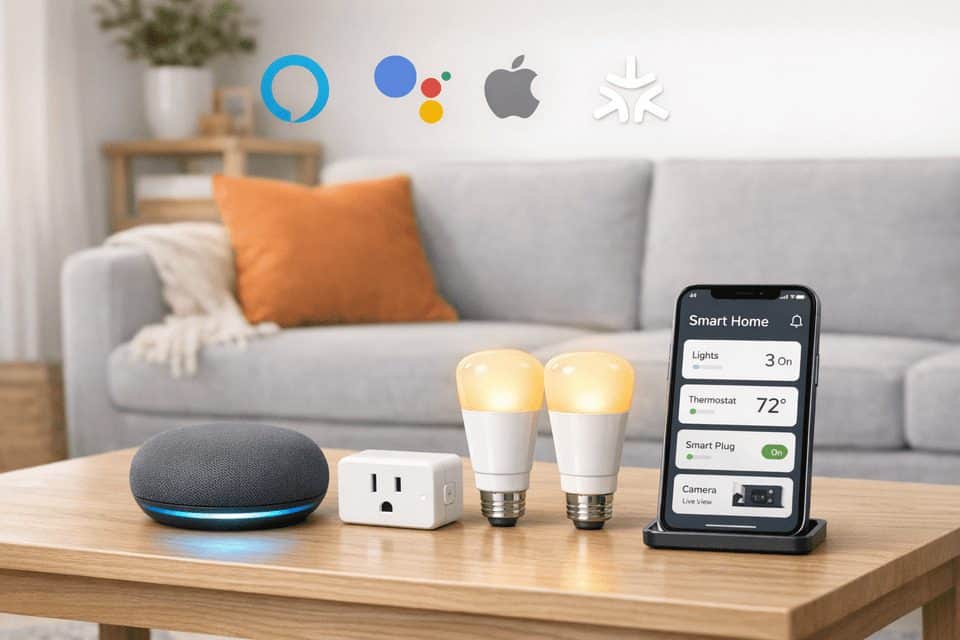
For most beginners, start with:
- Smart speaker or display as your control center
- Two smart bulbs for a living room or bedroom
- One to two smart plugs for lamps, fans, or coffee makers
Practical tip: start with smart plugs before hardwiring smart switches. They are cheaper, renter-friendly, and easy to move if your plan changes.
If plugs are part of your starter setup, this guide to smart plugs energy saving benefits can help you decide whether energy monitoring is worth paying for.
Smart Home Hub vs No Hub
Choose no hub if you want the simplest path, plan to stay under roughly 10 to 15 devices, and do not want extra hardware. Choose a hub if you want better reliability, more sensors, more rooms, or less dependence on Wi-Fi-only devices. This allows you to integrate a variety of helpful devices, such as smart home humidity sensors for basements and other damp areas.
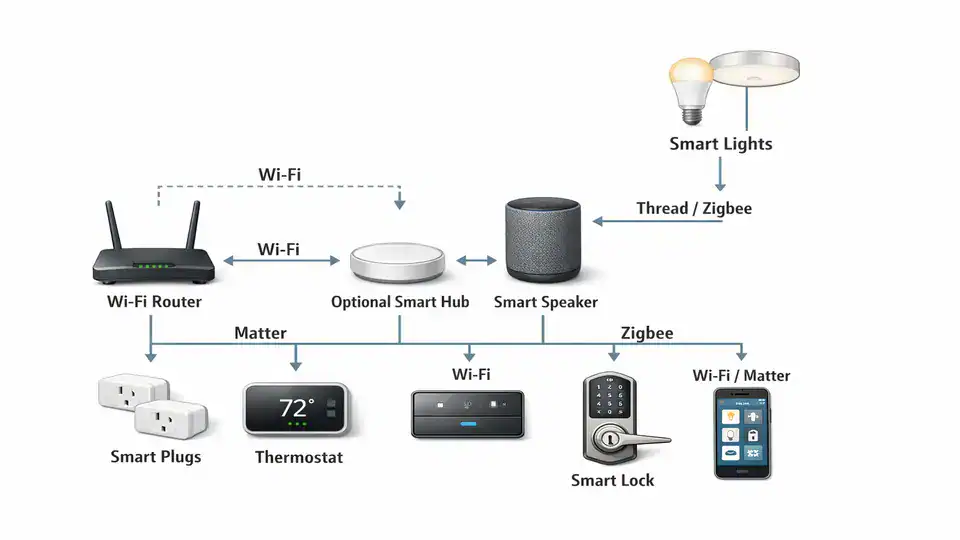
A simple ecosystem view helps: phone app, router, optional hub, then devices by protocol.
Common Mistakes That Make Smart Homes Feel Harder
Mistake one is buying based on discounts instead of compatibility. Mistake two is assuming your Wi-Fi can handle everything. A weak or crowded network can cause random disconnects, delayed commands, and devices that appear offline for no clear reason.
Bluetooth is another trap. It is fine for setup and nearby control, but not great as the backbone of a whole-home system. Cloud dependency also matters. Some devices rely heavily on remote servers, which means outages, app changes, or account issues can break routines.
Privacy deserves more attention than it gets. Cameras, microphones, and smart locks collect sensitive data. If that makes you uneasy, lean toward local control where possible, use strong passwords, enable two-factor authentication, and review privacy settings in each app.
If you want convenience without building too much at once, this list of smart home automation ideas for everyday convenience is a safer next step than buying random devices.
Which Path Makes Sense for Your Home?
Best for simplicity: Alexa or Google smart speakers with compatible bulbs and plugs. This is ideal for renters, first-time users, and anyone who wants voice control without a weekend of troubleshooting.
Best for privacy: Apple Home. This is ideal for iPhone households that value tighter privacy controls and a cleaner app experience.
Best for future-proofing: a Matter-friendly setup with Thread border router support. This is ideal for people who expect to grow their system over time and want less lock-in.
Best for renters: smart plugs, bulbs, speakers, and removable sensors. Skip hardwired switches or permanent locks unless your lease allows them.
No system is flawless, and that honesty matters more than brand loyalty.
One-Weekend Smart Home Setup Guide
Here is the practical rollout I recommend if you want a setup that feels manageable.
| Step | What to Do | What to Check |
|---|---|---|
| Choose ecosystem | Pick Alexa, Google, Apple, or Matter-first | Phone type, privacy, device support |
| Check Wi-Fi | Test signal in the first room | Dead zones, router age, 2.4GHz support |
| Buy first devices | Speaker, two bulbs, one plug | Compatibility labels and app requirements |
| Create routine | Schedule lights at sunset or bedtime | Make sure it works for three days |
| Expand gradually | Add thermostat, lock, sensors, or cameras later | Only after the starter setup is stable |
Practical tip: test one room before a whole-home rollout. One room gives you fast feedback on app quality, Wi-Fi strength, and whether you even like voice control in daily life.
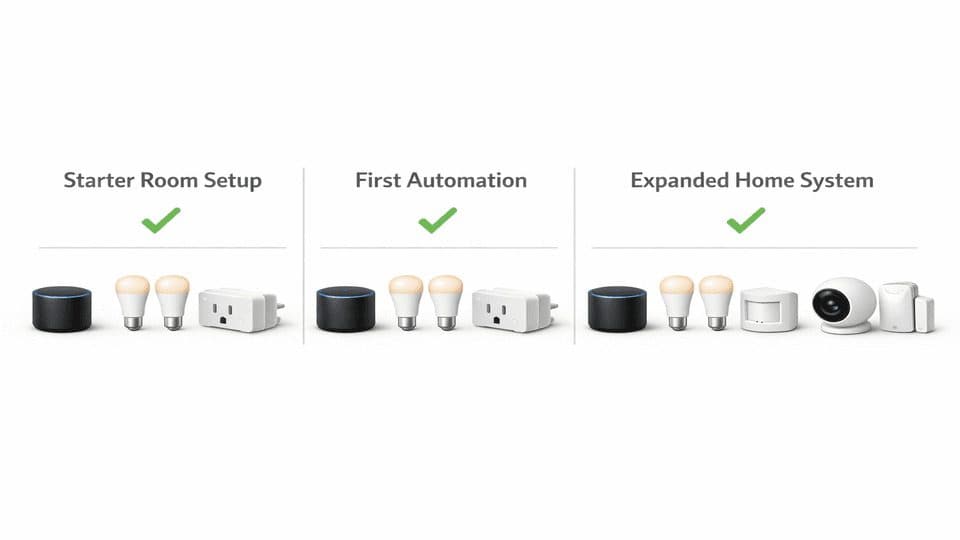
Think in phases: starter room, first routine, then expansion.
Recommended Internal Reading
External Resources
FAQ
Do I need a hub for a smart home?
No. Many beginners can start without a hub using a speaker plus Wi-Fi bulbs and plugs. But if you plan to scale to multiple rooms, add sensors, or want better reliability, a hub can help.
Can I mix Alexa and Google in the same home?
You can, but beginners should usually choose one main ecosystem. Mixed assistants often create duplicate setup steps and confusion about where automations live.
What if my Wi-Fi is weak?
Fix that before adding lots of devices. Weak Wi-Fi causes disconnects, slow commands, and failed automations.
Is a smart home worth it for renters?
Yes, if you focus on portable devices such as smart plugs, bulbs, speakers, and removable sensors.
What should I buy first?
Start with one smart speaker or display, two bulbs, and one smart plug. Use them in one room before expanding.
Should beginners use Matter devices?
Matter can be a good long-term choice, but support still varies by brand. Beginners should still confirm platform compatibility before buying.
Start Smaller Than You Think
If you take one thing from this article, let it be this: the right foundation matters more than the number of devices you own.
Choose your ecosystem first. Check compatibility. Start with a speaker, lights, and plugs. Build one routine that solves a real daily annoyance. Then live with it for a week.
A smart home should feel boring in the best possible way: it just works.