Best smart home cameras comparison for buyers who don’t want regrets
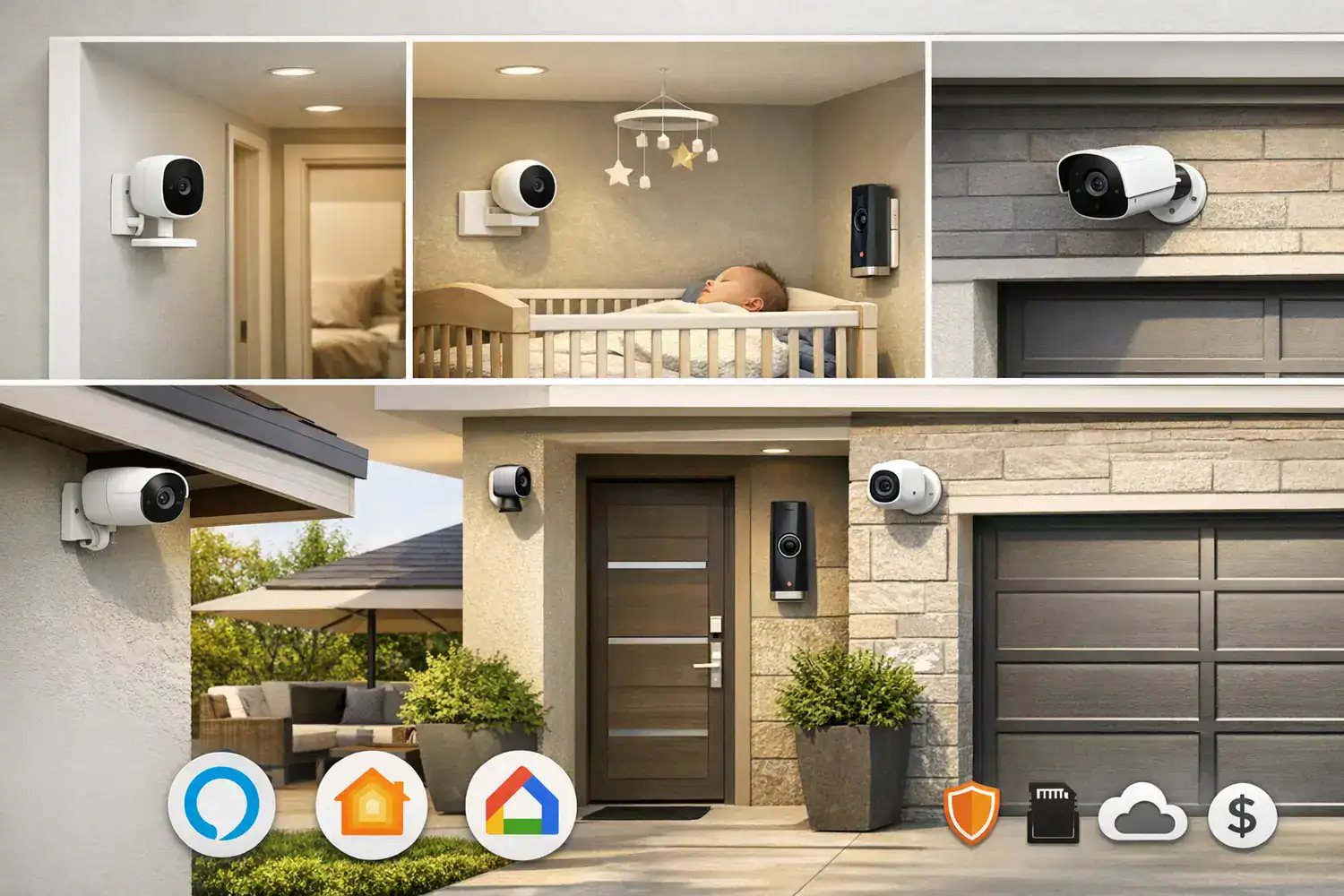
Best smart home cameras comparison starts with an uncomfortable truth: the setup that looks perfect on a product page can turn annoying, expensive, or unreliable once it’s actually in your home. Whether you’re covering a front door, apartment entry, nursery, driveway, or backyard, the real decision isn’t just brand versus brand. It’s camera type, storage model, ecosystem fit, and how much daily friction you can tolerate. Getting this right means thinking past the product page and into the day-to-day.
I’ve tested camera setups that sounded great on paper but fell apart in daily use: delayed alerts, weak Wi-Fi in one corner of the house, and “free” features that quietly moved behind a subscription later. This guide is built to help you avoid that mess and narrow down the right option fast. The subscription trap is the one that sneaks up on you.
- Renters usually do best with wireless indoor or battery-powered cameras that use adhesive mounts and local storage if possible.
- Homeowners often get better long-term reliability from wired outdoor cameras or plug-in cameras in key indoor spots.
- Privacy-focused buyers should prioritize local storage, two-factor authentication, end-to-end encryption where available, and clear data policies.
- 4K is not the main deciding factor; motion detection accuracy, app speed, and night performance matter more in daily use.
- Subscriptions can double your real cost over 2 to 3 years, especially with multiple cameras.
The fastest way to shortlist the right camera setup
Search-intent answer: most buyers should start by matching camera type to living situation, then check ecosystem compatibility, then compare storage and subscription costs.
- Best for renters: wireless indoor cameras, battery door-area cameras where allowed, and models labeled as smart home cameras with local storage.
- Best for homeowners: plug-in indoor cameras plus wired or solar-assisted outdoor cameras for fewer charging headaches.
- Best for privacy: local storage, HomeKit Secure Video support, or brands with strong encryption and clear privacy controls.
- Best for Alexa: Ring and Blink are usually the easiest fit.
- Best for Apple HomeKit: Logitech, Eve, and selected Aqara models are often stronger choices.
- Best for Google Home: Nest cameras integrate most cleanly.
If you are torn on wired vs wireless security cameras, the simplest rule is this: wired wins on consistency, wireless wins on convenience. That sounds obvious, but it matters more than any spec sheet. A camera that records every event is better than a prettier camera that misses them. The wireless one feels freeing until the first dropped frame at the wrong moment.
Why your camera choice affects daily life more than you expect
The wrong camera setup creates friction every day. You get too many alerts. The app loads slowly when you need it most. A battery dies during a cold week. Or the camera works fine in the kitchen but struggles near the garage because your router signal drops through brick, tile, or metal-backed insulation. Home layout, wall materials, and network congestion can change performance more than brand marketing suggests. This setup rewards the kind of patience most people don’t have for a device that’s supposed to make life simpler.
Long-term cost is another trap. A single camera with a $3 to $10 monthly plan may feel harmless. Add three or four cameras, person detection, cloud history, and package alerts, and you can end up paying $120 to $300 per year. Over three years, that can exceed the hardware cost. Research from sources like Consumer Reports has also highlighted that some of the best value comes from cameras that remain useful without a subscription. This is the kind of math that only adds up if you stop at one camera.
I learned this the annoying way in my own testing. One outdoor battery camera looked excellent in daylight but became high-maintenance once motion frequency increased near a busy sidewalk. Alerts were constant, battery life dropped fast, and the app felt cluttered. A camera should reduce stress, not create a new chore. What looks like a bargain on paper turns into a chore once the sidewalk starts feeding it motion triggers.
A practical comparison table before you spend anything
| Option | Typical Cost Range | Reliability | Install Effort | Maintenance | Best Fit |
|---|---|---|---|---|---|
| Indoor plug-in | $25–$150 | High if Wi-Fi is stable | Low | Very low | Nursery, pets, hallway, living room |
| Outdoor wired/plug-in | $80–$250+ | Usually highest | Medium to high | Low | Driveway, backyard, entry points |
| Outdoor battery wireless | $70–$230 | Good, but depends on signal and weather | Low | Medium to high | Renters, quick installs, flexible placement |
| Cloud storage | $0–$30/month depending on system | Easy remote access | Low | Subscription management | Users who want event history anywhere |
| Local storage | $0 ongoing, sometimes SD/NVR cost | Strong if hardware is managed well | Low to medium | Card/NVR upkeep | Privacy-focused buyers, budget-conscious long term |
| Ecosystem fit | Varies by brand | Best within same platform | Low after setup | Low | Alexa, Google Home, or Apple users |
Best smart home cameras comparison: the trade-offs that actually matter
Indoor vs outdoor smart home cameras
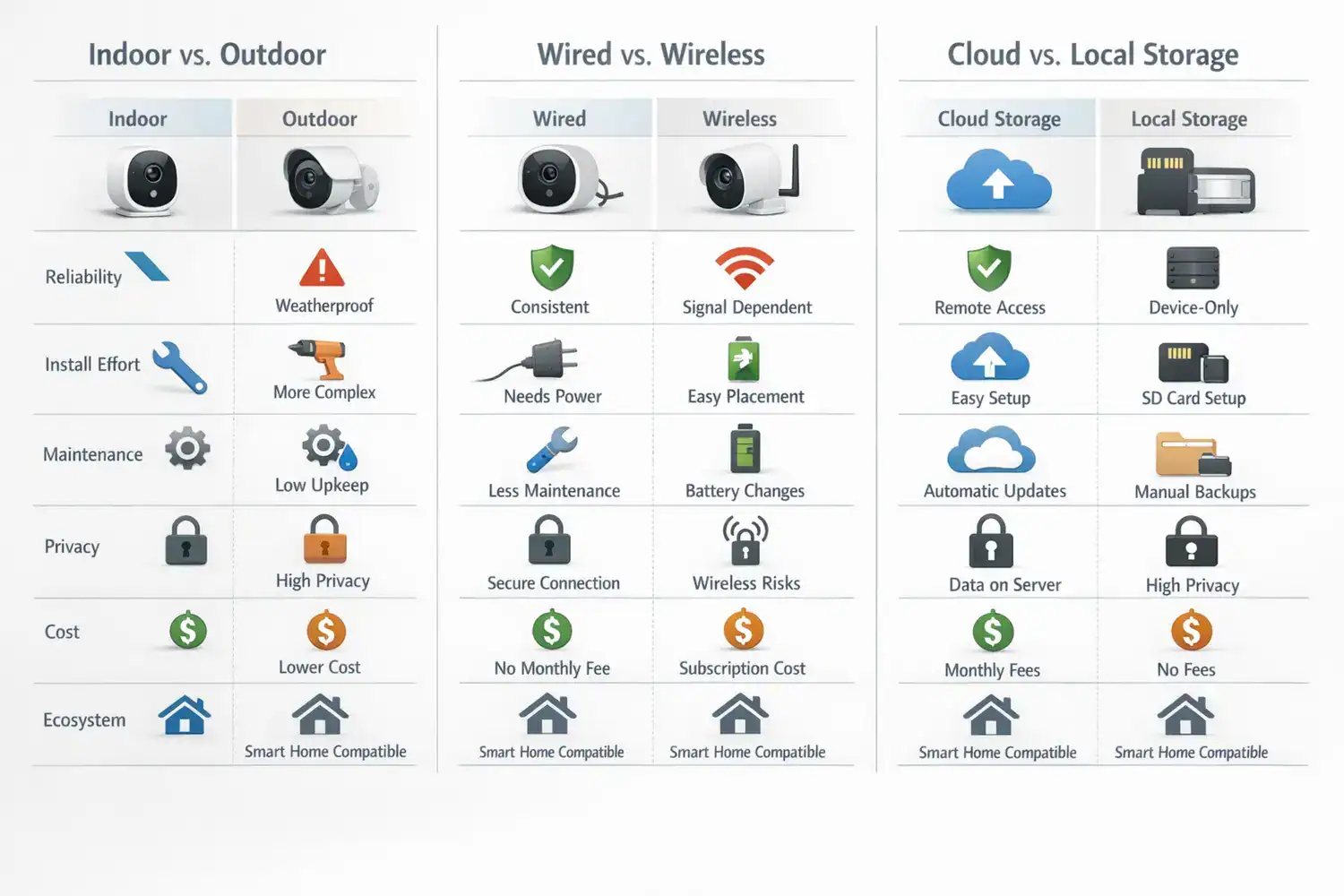
Indoor cameras are cheaper, easier to power, and usually more stable because they avoid weather and extreme temperatures. Outdoor models need weather resistance, wider dynamic range for bright daylight, and stronger night vision. If you want evidence at a front door or driveway, outdoor-specific hardware is worth paying for. Indoor cameras pointed through a window often fail at night due to glare and infrared reflection. The indoor camera’s price looks like a shortcut until the window glass turns it into a mirror at night.
Wired vs wireless security cameras
Wireless is easier, especially for renters, but “wireless” usually still means Wi-Fi plus a battery or power cable. Fully battery-powered models are convenient, yet they may record shorter clips to save power. Wired or plug-in cameras tend to capture more consistently and reduce maintenance. Reviews from Wirecutter and PCMag repeatedly point to this trade-off: convenience versus consistency. Convenience sounds like freedom until you’re climbing a ladder mid-week to swap a dying battery.
Video quality and night vision comparison
This is where people get distracted. I made this mistake myself: I once overvalued 4K resolution and ignored motion accuracy and app usability. The result was a sharper image of the wrong moment. In practice, 1080p or 2K with good HDR, fast loading, and usable night vision often beats a higher-resolution camera with lag or poor exposure. The most expensive sensor means very little if the app opens slowly while someone is already walking away. The second look at the footage is when you realize resolution never caught the license plate anyway.
Motion detection accuracy comparisons
Smart detection has improved, but no brand gets it perfect. Trees, headlights, insects, rain, and shadows still trigger false alerts. Person, package, vehicle, or pet detection can help, but many brands reserve advanced filtering for paid plans. Placement matters more than people expect. A camera angled across a walkway usually detects motion better than one pointed straight down a path. The false alerts that feel random on day one start making sense once you watch the pattern of light and shadow through the lens.
Smart home camera storage options and privacy
For smart home camera storage options, cloud is easiest for off-site access and sharing clips. Local storage is often cheaper over time and better for privacy, especially if you want to avoid recurring fees. If privacy features in home security cameras matter to you, look for two-factor authentication, end-to-end encryption where available, microphone/camera kill controls, and a clear statement on how footage is stored. Good starting points for ecosystem details are Google Home, Apple Home, and Alexa Smart Home.
Subscription costs and ecosystem lock-in
This is the honest downside many buyers discover late: smart home camera subscription costs can change over time, and vendors sometimes move useful features behind paywalls. Cloud history, rich alerts, facial recognition, package detection, and longer clip retention may disappear unless you subscribe. If you plan to keep cameras for 3 to 5 years, calculate total ownership cost, not just the sale price. The subscription decision asks for patience: a monthly fee that looks small today can double the camera’s cost over its lifespan.
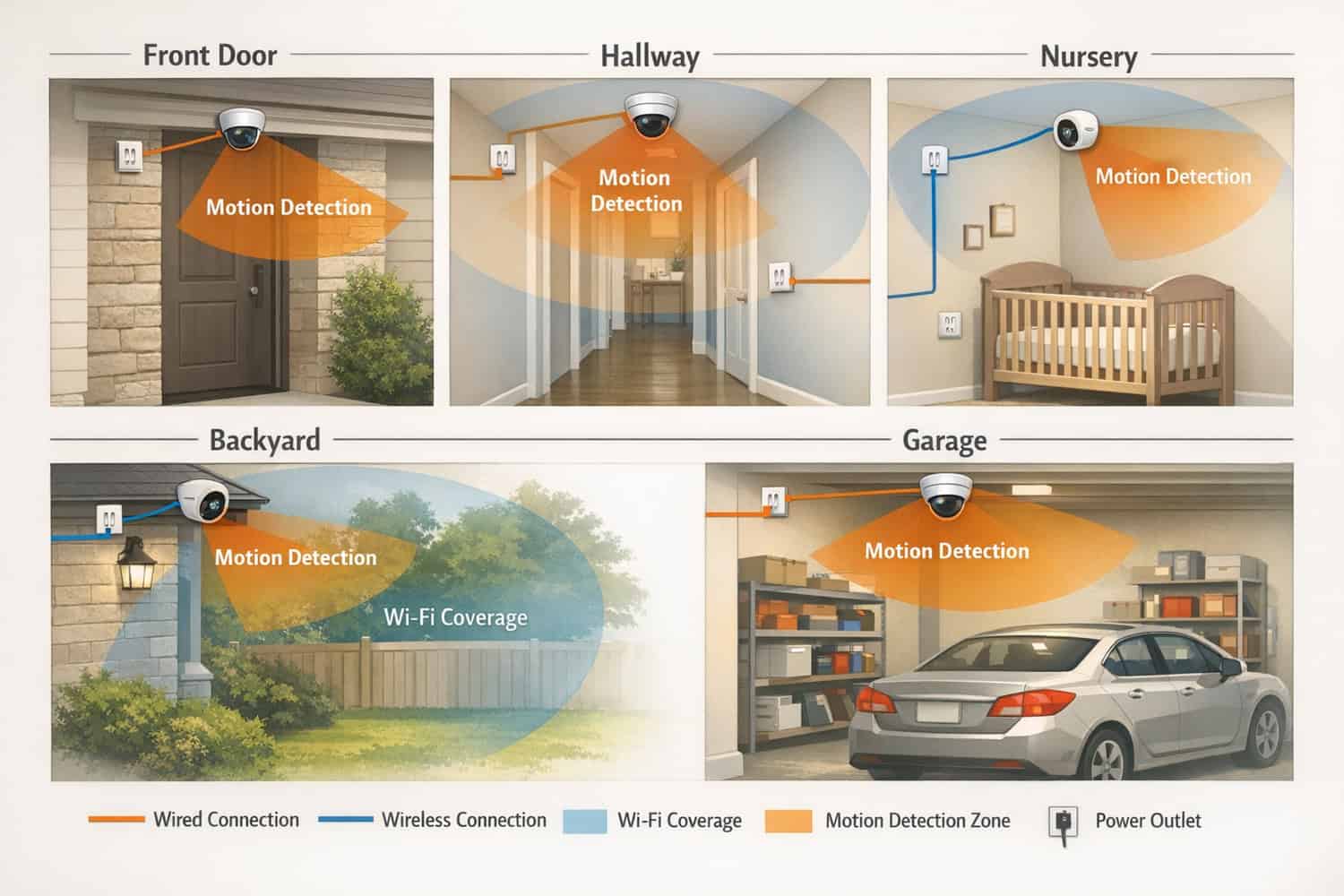
What I wish I knew before buying my first camera setup
Placement affects performance more than specs. A $60 camera in the right spot often beats a $200 camera mounted too high, aimed into glare, or placed where motion enters the frame too late. Try to cover approach paths, not just the final destination. For a front door, angle the camera to catch faces before someone reaches the threshold.
Battery drain is also highly situational. A quiet side yard may let a battery camera last months. A busy sidewalk, windy trees, or a road with headlights can cut that dramatically. One common misconception is that battery life claims reflect normal use. They usually reflect ideal conditions with limited events.
Another mistake is ignoring subscription creep. One camera at $4 per month feels small. Four cameras plus upgraded AI alerts can become a recurring bill you barely notice until renewal time. If your budget is tight, choose the features you need first and pay for convenience second.
Which setup makes sense for your home, budget, and tolerance for hassle?
Best for renters: lightweight wireless cameras, adhesive or shelf placement, and brands with local SD storage or low-cost single-camera plans. This is ideal if you want flexibility and easy removal later. You might want to skip battery-heavy outdoor setups if your building entrance gets lots of foot traffic.
Best for homeowners: mix plug-in indoor cameras with wired or permanently powered outdoor units. This is ideal for people who want fewer missed events and less charging. Skip this if you do not want any drilling, cable routing, or weatherproofing work.
Best for privacy-focused users: choose smart home cameras with local storage, strong account security, and minimal cloud dependence. HomeKit-friendly setups often appeal here, though hardware choice is narrower. If you want broad device selection and the easiest shopping experience, this path can feel more limited.
Best budget setup: one indoor plug-in camera plus one outdoor battery camera, with local storage where available. Expect roughly $80 to $250 total depending on brand. Best premium setup: multi-camera wired or plug-in system with advanced detection and paid cloud history, often $400 to $1,200+ before subscriptions.
Best camera ecosystem for Alexa Apple HomeKit Google Home: Alexa users often get the smoothest experience with Ring or Blink; Google Home users usually benefit from Nest; Apple users should prioritize HomeKit-native cameras or HomeKit Secure Video support. If your home already includes smart displays, speakers, and routines, staying inside one ecosystem usually means fewer quirks.
A simple plan that cuts through decision fatigue
| Step | What to Decide | Why It Matters |
|---|---|---|
| 1 | Define coverage areas | Front door, hallway, nursery, backyard, garage each need different camera types. |
| 2 | Choose indoor/outdoor and wired/wireless | This determines install effort, reliability, and maintenance. |
| 3 | Check ecosystem compatibility | You want alerts and live view on devices you already use. |
| 4 | Evaluate storage and subscription | This shapes your 2- to 3-year cost more than many buyers expect. |
| 5 | Plan Wi-Fi and power access | Weak signal and awkward charging are common failure points. |
| 6 | Secure account and privacy settings | Use 2FA, update firmware, review sharing permissions, and set activity zones. |
If you are new to connected devices, these guides can help you avoid ecosystem mismatch and setup headaches: smart home setup guide for beginners, smart home automation ideas for convenience and security, and best smart home devices for beginners.
The questions people still ask before they buy
Do I need a subscription for a smart home camera?
Not always. Many cameras offer live view for free, and some support local SD storage or local hubs. The catch is that cloud recording, longer event history, person detection, and richer alerts are often paid features. If you want to avoid recurring fees, look specifically for local storage support and confirm which features still work without a plan.
Are wireless cameras reliable enough for security?
Yes, for many homes, but they are more dependent on Wi-Fi quality, battery health, and placement. Wireless cameras are often the best fit for renters or lighter-duty coverage. For critical areas like a main driveway or back gate, a wired or plug-in model is usually more dependable over time.
Are smart home cameras safe from hacking?
No internet-connected device is risk-free, but you can reduce risk a lot. Use a strong unique password, enable two-factor authentication, keep firmware updated, and avoid reusing old accounts. Also review microphone settings, sharing permissions, and whether the brand offers encryption and transparent privacy controls.
What matters more: 4K video or better motion detection?
For most buyers, better motion detection and a faster app matter more. Clear footage is useful, but the camera has to catch the right moment first. In my experience, a good 2K camera with reliable alerts is more useful than a 4K camera that misses events or floods you with false notifications.
Build your shortlist with fewer surprises
The smartest way to use this best smart home cameras comparison is to stop chasing the “best” camera in the abstract and choose the best fit for your layout, privacy comfort level, and tolerance for maintenance. For example, a damp basement might need one of the best smart home humidity sensors more urgently than another camera. Start with your highest-priority area. Decide whether you care more about easy installation or maximum reliability. Then compare storage and subscription costs before you buy.
If you want a low-risk path, begin with one indoor plug-in camera and one outdoor camera in your main problem area. Test alerts, night video, and app speed for two weeks. That small trial tells you more than ten spec sheets. I genuinely think most buyers make better decisions when they treat cameras like part of a system, not as isolated gadgets.
The best setup is the one you’ll actually maintain, trust, and keep using after the first month.
Ready to narrow your setup?
Use this article to pick your camera type first, then match it to your ecosystem and storage preference. If you’re still building your smart home foundation, these beginner-friendly resources can help:
best smart home starter kits for beginners
|
best smart home devices for beginners