How to get one clean health view when every device says something different
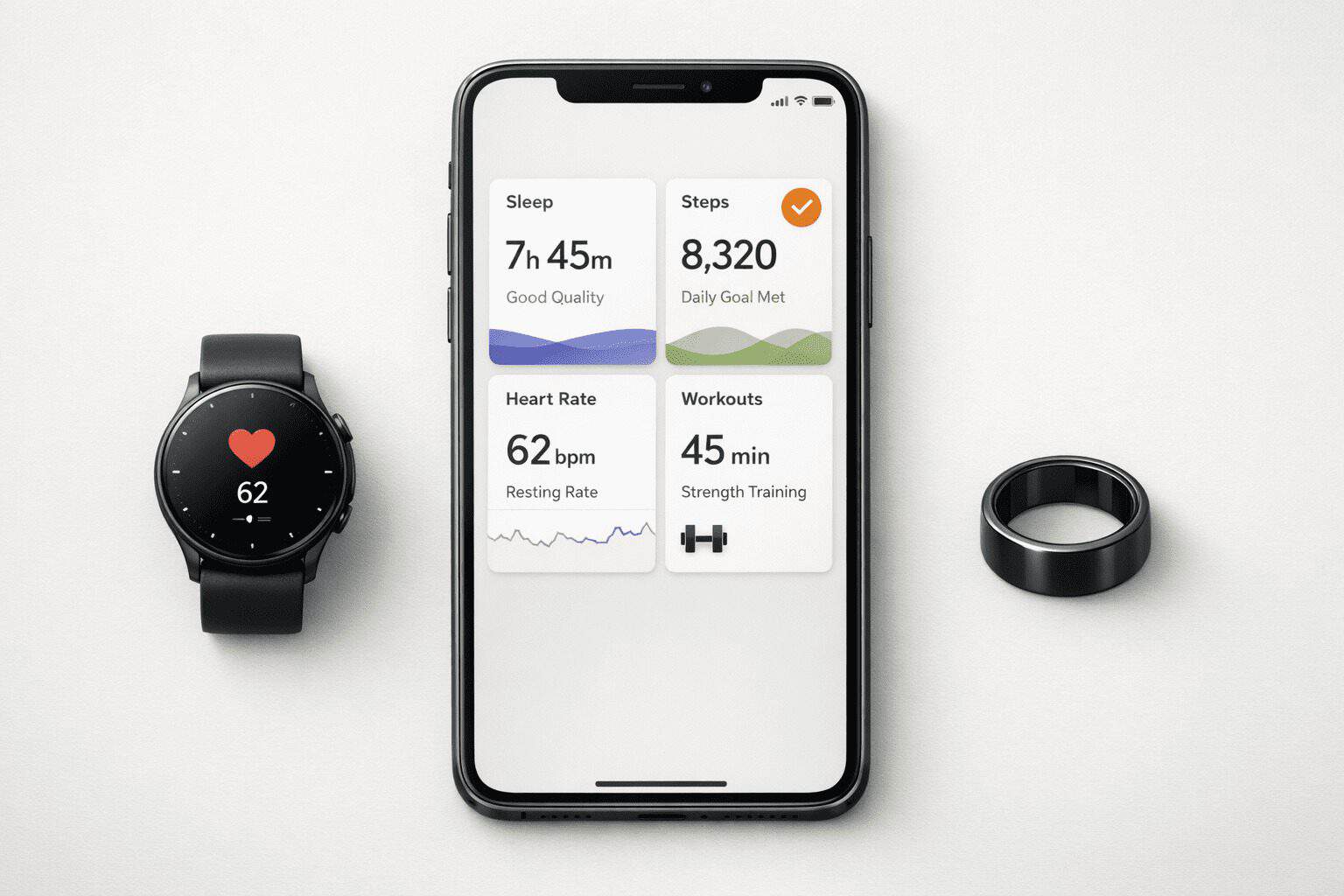
To sync wellness data across devices without creating chaos, you need one central hub, one writer per metric, and a short audit before you trust the numbers. That sounds obvious now, but I learned it the hard way: my watch logged 8,900 steps, my phone app showed 11,200, my sleep ring recorded a shorter night, and a training app somehow imported both versions. The result looked clean on screen and was completely wrong in practice. The polished screen hides the mess underneath—until you actually try to act on the numbers.
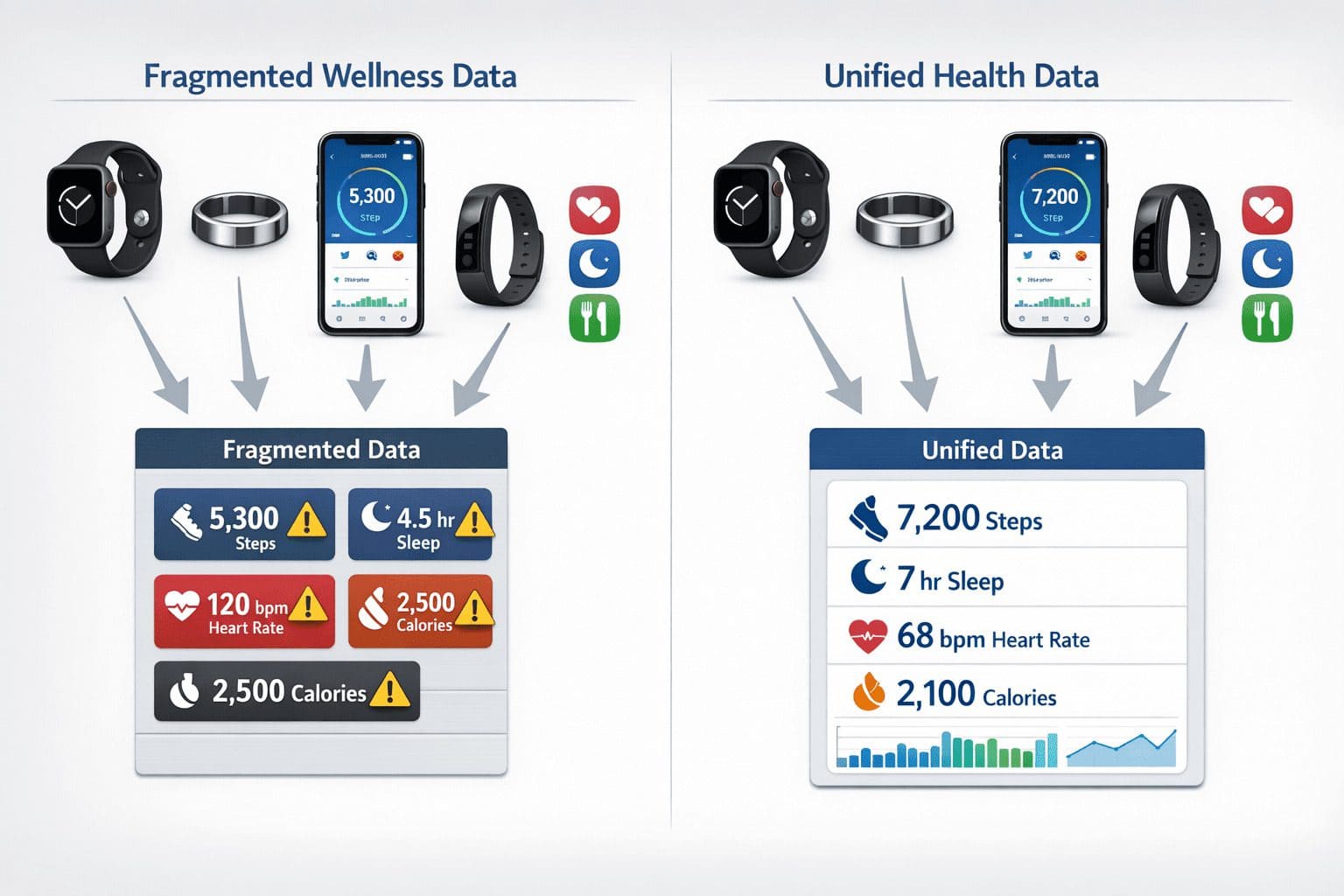
This is the real problem with modern wellness tracking: you do not have one truth, you have several competing truths. A smartwatch, phone, fitness app, sleep tracker, and readiness platform can all collect overlapping data, define it differently, and sync on different schedules. If you connect everything blindly, you can end up with duplicate steps, missing sleep, inflated calories, or trends that look convincing but are built on bad inputs. The good news is that a reliable setup is possible if you build it in the right order.
Quick Summary
- Pick a single source of truth first, usually Apple Health on iPhone or Google Fit on Android.
- Allow only one app to write each metric such as steps, heart rate, sleep, or workouts.
- Use native integrations before third-party connectors; they are usually cleaner and less likely to duplicate data.
- Check permissions, background refresh, battery settings, and sync timing before assuming something is broken.
- Test with one day of data or one workout, then audit for duplicates, gaps, and weird timestamps.
The setup order that prevents duplicates before they start
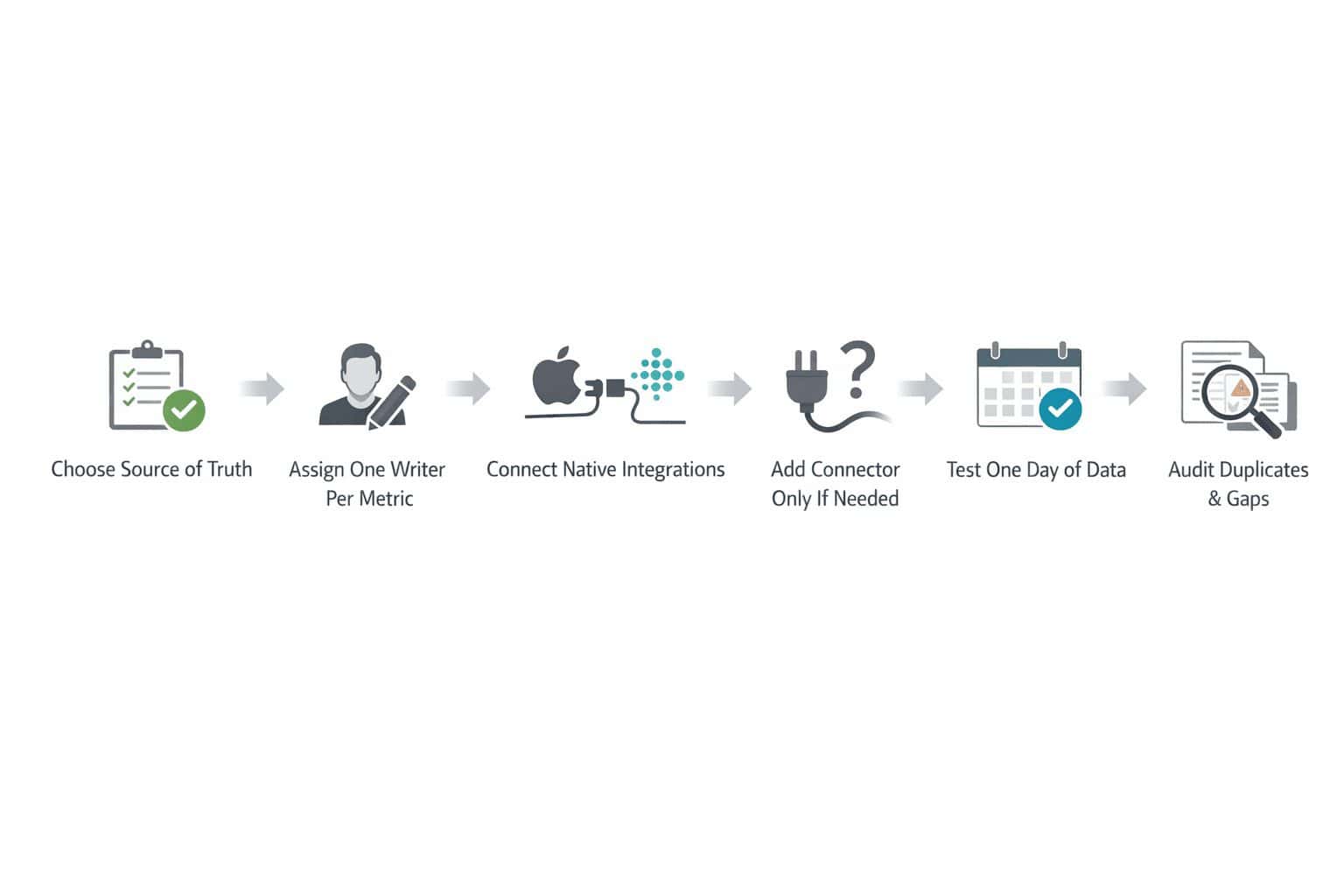
If you want the short version, here it is. First, choose your hub: Apple Health if you live on iPhone, Google Fit if you are on Android and your apps support it, or in some cases a platform-specific app like Fitbit or Garmin if that is where most of your data originates. Second, decide which app is allowed to write steps, which app writes sleep, and which app writes workouts. Third, connect native integrations before touching connectors like Health Sync, Sync Solver, or FitnessSyncer. Fourth, verify app permissions, background sync, and battery restrictions. Fifth, check one full day of data for duplicates, gaps, or odd timestamps.
This is simpler than it looks, but only if you do it in that order. I have seen people start by linking every service they own because the buttons are right there. That usually creates a polished mess. Cross-device health data management works best when you treat it like a system, not a pile of app connections.
Why syncing feels easy until the numbers stop making sense
Wellness ecosystems are fragmented by design. Apple, Google, Fitbit, Garmin, Oura, Polar, Whoop, and dozens of app developers all collect overlapping data, but they do not define every metric the same way. Sleep stages can differ because one company emphasizes movement while another leans more on heart rate variability and skin temperature. Calories can differ because one app shows active calories while another blends active and resting energy. Readiness scores are even less portable because they are usually proprietary.
That means wearable wellness data integration is not just a technical issue. Solving these integration problems is a key part of emerging wellness wearable technology trends. It is also a measurement issue. Your phone may count steps from pocket movement while your watch counts arm swing, and the gap gets worse if you wear the watch on your dominant wrist. I have seen my own step totals drift by more than 1,500 steps on a busy day just from carrying groceries with one arm and leaving my phone on a desk for half the afternoon. Sleep can be even messier when a ring detects restlessness differently than a watch.
The danger is that bad sync looks trustworthy. A dashboard with clean graphs can still be wrong. If duplicate workouts inflate your training load or missing sleep lowers your recovery estimate, you may change your routine based on faulty signals. That is why fitness tracker data consolidation matters more than convenience. It affects the decisions you make.
Where compatibility breaks: the ecosystem reality check
This is where expectations usually break. People assume every major platform can freely exchange data with every other one. It cannot. Some apps read from Apple Health but do not write back. Some Android apps support Google Fit only partially. Some wearables export workouts but not sleep. And direct Apple Health Google Fit sync is still limited without a third-party bridge.
| Platform | Best role | Read/Write pattern | Native sync notes | Typical limits / costs |
|---|---|---|---|---|
| Apple Health | Central iPhone hub | Many apps can read and write, with source priority controls | Strong native support across iOS wellness apps | No direct built-in sync to Google Fit; connectors may cost about $5 to $25 one-time or subscription depending on tool |
| Google Fit | Android-friendly hub | App support varies more than on iPhone | Works best where apps still maintain Fit support | Some brands prioritize their own app over Fit; cross-platform imports can be patchy |
| Fitbit | Device-first ecosystem | Good internal consistency inside Fitbit app | Limited openness compared with platform hubs | Premium features may require subscription; mixed-device syncing is not the cleanest |
| Garmin Connect | Training-heavy source app | Strong for workouts and body metrics within Garmin | Can connect outward, but not every metric flows both ways | Best when Garmin is your primary device; mixed sleep syncing can be awkward |
If you want official details, start with Apple’s HealthKit documentation and Google’s Fit documentation. For a clear consumer-level overview of centralizing data, this guide from Kygo is also useful.
How sync wellness data across devices actually works in the real world
Native sync is usually the cleanest option
Native sync means an app directly supports Apple Health, Google Fit, or another official platform pathway. This is usually the least messy route because the app developer built and tested that connection intentionally. If your sleep app can write sleep analysis to Apple Health, and your training app can read it from there, that is cleaner than bouncing data through two third-party services.
Platform hubs keep the system stable, but they are ecosystem-bound
Using Apple Health or Google Fit as your central dashboard works best when your phone is the center of your life anyway. It gives you one place to review permissions and source priority. On iPhone, Apple Health is often the obvious answer because so many apps support it. On Android, Google Fit can still play that role, although support can vary by brand and app category. If you are mostly inside one ecosystem, this is the path I would choose first.
Connectors solve gaps, but they also create new failure points
Third-party tools such as Health Sync, Sync Solver, and FitnessSyncer exist because official pathways are incomplete. They can be genuinely useful, especially for mixed-device setups. But they add another layer of permissions, another sync schedule, and another chance for duplicates. Some charge a one-time fee around $5 to $10, while others use subscriptions that can run roughly $3 to $10 per month depending on features. That cost is not huge, but the bigger trade-off is complexity.
Also, remember the difference between app-level and wearable-level syncing. A watch may sync to its own brand app first, then that app exports to Apple Health, then another app reads from Apple Health. That is three layers already. If your phone also tracks steps and writes them directly, you now have overlapping sources. This is where sync sleep data heart rate steps setups break most often. The numbers are not always wrong because the software failed; sometimes they differ because the devices measured different things in the first place.
The mistakes that quietly ruin your dashboard
The biggest mistake I made was allowing multiple apps to write steps. My phone, watch app, and a third-party connector all had permission. For two days, my totals looked fantastic. Also fake. Once I dug into source data, I realized I had inflated counts and duplicate walking workouts. That is the first rule: only one app should write each metric. One for steps, one for sleep, one for heart rate, one for workouts if possible.
The second common mistake is assuming sync is instant. It often is not. Some apps update every few minutes, some only when opened, and some wait until the wearable syncs to its own app first. Battery optimization on Android can also block background transfers. On iPhone, background app refresh and Health permissions can still trip you up. If data looks missing, check timing before you start reconnecting everything.
There is also the privacy side. Wellness data privacy across devices matters because every extra connector or app gets access to sensitive information: sleep patterns, heart rate, activity times, maybe even reproductive health or location-linked workouts. If you do not need a service to write data, do not give it write access. If you do not need it at all, remove it. Fewer pipes usually means fewer leaks.
Best setup by device mix, and when less syncing is the smarter move
Apple ecosystem users: If you use an iPhone, Apple Watch, and several wellness apps, make Apple Health your source of truth. Let Apple Watch handle steps and heart rate, let your preferred sleep app write sleep only if it is better than Apple’s own tracking, and keep other apps mostly in read mode. This is ideal for people who want a stable unified wellness dashboard with minimal maintenance.
Android with mixed wearables: Use Google Fit if your chosen apps still support it well. If support is inconsistent, you may be better off choosing the strongest device ecosystem app as your main source, then exporting selectively. This setup is ideal for people who use one primary wearable and just need a few secondary apps to read data.
Fitbit-only or Garmin-heavy users: If nearly all your data comes from one brand, staying inside that ecosystem is often cleaner than forcing everything into a universal dashboard. You might want to skip full integration if you only glance at steps, workouts, and sleep inside one app anyway. Overconnecting can create more maintenance than value.
Oura mixed setups: Oura with Apple Health is generally easier than Oura with a fragmented Android stack, especially if you want sleep and readiness to influence other apps. Honest downside: perfect cross-platform sync between Apple and Google is still limited and sometimes impossible without compromises. If you need flawless two-way syncing across both worlds, you will probably be disappointed.
For related decisions, see our Guide to choosing the best fitness tracker ecosystem, Apple Health tips and hidden settings, Google Fit vs Fitbit comparison, Best sleep tracking apps reviewed, and Privacy guide for health and wellness apps.
A simple checklist that makes sync wellness data across devices reliable
If you want a setup that lasts longer than one weekend, follow a checklist. This is the process I wish I had used first instead of fixing a tangled system later.
| Step | What to do | What to check |
|---|---|---|
| Pick your hub | Choose Apple Health, Google Fit, or one brand app as source of truth | Where will you review trends most often? |
| Map metric ownership | Assign one writer each for steps, sleep, heart rate, workouts | No metric should have 2 or 3 active writers |
| Connect native first | Use official integrations before any connector | Read/write permissions are correct |
| Add connector only if needed | Bridge missing pathways with a trusted sync tool | Know the fee and sync interval |
| Test small | Sync one workout or one day of data first | Look for duplicates, gaps, timezone errors |
| Monitor one week | Review trends daily for 7 days | Confirm delayed sync is not causing false alarms |
The edge cases people ask about after setup
Why am I seeing duplicate steps?
Usually because more than one app is writing step data. Common culprits: your phone, your watch app, and a connector all pushing steps into the same hub. Check source priority in Apple Health or permissions in Google Fit-related apps, then disable write access for secondary sources. The watch that’s supposed to help you move more is often the one inflating your step count.
Why is my sleep not syncing correctly?
Sleep is one of the least standardized metrics. Different devices estimate bedtime, wake time, and stages differently. Also, some apps write total sleep but not detailed stages. Check whether your sleep app exports only summary data, and make sure another app isn’t overwriting it later. Getting consistent sleep data means picking one source and sticking with it.
Can I sync Apple Health with Google Fit?
There’s no built-in direct pathway that handles this cleanly. You’ll usually need a third-party connector, and even then, not every metric transfers perfectly or bidirectionally. If you depend on both ecosystems, expect compromises and test carefully before you trust the merged results. The setup asks for patience upfront so the data doesn’t waste your time later.
What about historical imports, timezones, and delayed updates?
Historical data imports vary a lot by app. Some backfill months or years; others only sync from the day you connect them. Timezone mismatches can split sleep into odd chunks or shift workouts by several hours. If you travel often, check timestamps after flights and watch for overnight sleep records that cross midnight differently. A timezone shift can quietly undo a week of sleep data before you notice.
Build the simplest system you can trust, then stop tweaking it
The best wellness sync setup is usually not the most connected one. It is the one you can understand at a glance. Pick a source of truth, assign one writer per metric, use native integrations first, and audit the result before you trust your trends. If your dashboard is making you second-guess every number, the setup is too complicated.
I have ended up with a much simpler system than I started with, and honestly it works better. My watch writes steps and heart rate, my sleep device writes sleep, my training app mostly reads, and I only use a connector where there is no clean native path. That approach is less flashy, but it gives me numbers I can actually use.
If you are rebuilding your setup this week, start small. One day of clean data is more valuable than six apps pretending to agree.
Ready to clean up your wellness dashboard?
Start by choosing your source of truth today, then review write permissions before connecting anything else. If you need more help, compare ecosystems and tighten your settings with these guides:
→ Best supplement tracking apps that actually work
→ Build simple daily habits that reduce stress
→ Create a balanced lifestyle that actually sticks