Remote Work & Setup
Best Home Office Setup for Productivity (Without Wasting Money)
The best home office setup for productivity isn’t about aesthetics—it’s about fixing what quietly drains your focus every day. If your back aches by noon, your desk feels cluttered, and your lighting makes you squint, your setup is probably working against you.
I’ve been there. I once upgraded monitors, bought expensive accessories, and still felt frustrated—because the real issue was my chair height and lighting. This guide is built around that lesson: practical changes that actually improve how you work, not how your desk looks on social media.
What Actually Makes the Best Home Office Setup for Productivity?
The best setup balances four things: ergonomics, layout, lighting, and workflow fit. Start with a comfortable chair, proper desk height, eye-level screen, and clear lighting—and optimize what feels physically or mentally draining first.
Think of your setup as a system, not a shopping list:
- Ergonomics: prevents fatigue
- Layout: reduces friction
- Lighting: affects energy and focus
- Workflow fit: matches what you actually do all day
A minimal productive home office setup doesn’t require much:
- Supportive chair
- Desk at proper height
- External screen or laptop riser
- Consistent lighting
If something feels uncomfortable after two hours, that’s your first fix—not a new gadget.
Why Your Setup Matters More Than You Think
Most productivity advice focuses on habits. But your environment quietly decides how long you can actually stay focused.
Poor posture increases fatigue. Bad lighting creates subtle eye strain that builds into headaches. Noise interruptions—even low-level ones—break concentration cycles.
Remote work has changed the equation. You’re sitting longer, taking fewer natural breaks, and often working in spaces not designed for deep focus. According to trends in workplace wellness, long-duration sitting and poor movement patterns have become major concerns for remote professionals (source).
I didn’t realize how draining my setup was until I fixed it. Suddenly my afternoons felt calmer, less stressful, and I could actually think clearly after lunch instead of pushing through brain fog.
Hidden productivity drains include:
- Tangled cables creating visual clutter
- Overheating rooms or poor air circulation
- Screen glare forcing constant squinting
None of these scream “problem”—but together, they quietly reduce your output.
Core Setup Components (Quick Reference)
| Component | Ideal Features | Budget | Impact |
|---|---|---|---|
| Chair | Lumbar support, adjustable height/arms | $150–$1200 | Very High |
| Desk | Correct height, stable surface | $100–$800 | High |
| Monitor | Eye-level positioning, minimal glare | $150–$600 | High |
| Lighting | Soft, indirect, adjustable brightness | $30–$200 | Medium |
| Accessories | Keyboard, mouse, cable management | $20–$300 | Medium |
There’s no need to go premium everywhere. A good chair and decent lighting will do more for your productivity than a designer desk.
How to Build a Productive Home Office Setup That Actually Works
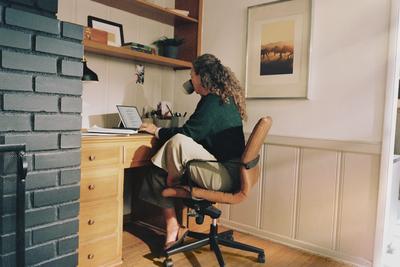
Ergonomics first. Your elbows should sit at roughly 90 degrees, feet flat on the floor, and screen at eye level. If not, discomfort creeps in fast.
Practical tip: I raised my monitor using a stack of books for weeks before buying a proper stand—and it worked perfectly.

Desk layout matters more than gear. Keep frequently used items within easy reach. Your keyboard and mouse should sit close enough to avoid shoulder strain.
Lighting and focus. Natural light helps, but glare can ruin your screen visibility. Position your desk perpendicular to windows if possible.
For artificial lighting, aim for soft, diffused light. Harsh overheads often feel mentally draining after a few hours.
Noise control. This is where real life gets messy. Shared spaces, roommates, or street noise can’t always be eliminated. Noise-canceling headphones or even consistent background sound can help create focus.
Match setup to work type:
- Deep work: minimal, distraction-free layout
- Calls: eye-level camera, clean background, front lighting
- Creative work: larger or multiple screens
For smaller homes, see small apartment workspace ideas for realistic layouts.
Clutter and cables. Visual noise matters more than people admit. A simple cable system can make your workspace feel calmer instantly—desk organization and cable management guide.
Common Mistakes That Kill Productivity
- Upgrading gear before fixing layout
- Buying ultra-wide monitors without checking desk space
- Standing desks used incorrectly (they’re not magic)
- Too many accessories cluttering your workflow
I learned this the hard way. I spent hundreds on upgrades while still feeling uncomfortable—because my basics were wrong.
Standing desks can help, but only if you use them consistently. Otherwise, they turn into expensive regular desks. If you’re exploring options, this best standing desks for home offices guide is a good starting point.
Even the best setup won’t eliminate fatigue entirely. You’ll still get tired—but the difference is how quickly it happens and how manageable it feels.
Which Setup Is Right for You?
| Setup Type | Best For | Pros | Cons |
|---|---|---|---|
| Minimalist | Deep focus workers | Low distraction, clean | Less flexibility |
| Feature-heavy | Tech-heavy workflows | Powerful, flexible | Expensive, clutter risk |
| Small space | Apartments/shared rooms | Compact, efficient | Limited comfort range |
| Dedicated office | Full-time remote workers | High customization | Higher cost |
If I had to recommend: invest in the ergonomic chair buying guide first, then build around it. Chair + desk is your foundation.
Step-by-Step Plan to Improve Your Setup
| Step | Action |
|---|---|
| 1 | Identify your biggest discomfort or distraction |
| 2 | Fix ergonomics (chair, desk, screen height) |
| 3 | Improve lighting conditions |
| 4 | Reduce noise and clutter |
| 5 | Upgrade tools only if needed |
Real-life tip: Work one full day, notice exactly where discomfort builds, then fix that first. It’s surprisingly revealing.
For broader strategies beyond setup, check remote work productivity tips guide.
Frequently Asked Questions
Do I need a standing desk?
No. It helps some people, but only if used correctly. Movement matters more than the desk itself.
What’s the best chair for long hours?
Look for strong lumbar support and adjustability. Price helps, but fit matters more than brand.
Is dual monitor worth it?
Yes for multitasking roles, less so for deep focus work.
How do I set up in a small room?
Prioritize compact furniture and vertical space. See small apartment workspace ideas.
Technology trends—even wearable ones—are increasingly focused on comfort and productivity tracking (source, source), but your physical setup still does most of the heavy lifting.
Conclusion: Productivity beats aesthetics. A clean, comfortable, functional setup will always outperform a beautiful but impractical one.
Start Improving Your Setup Today
You don’t need a full overhaul. Fix one thing—the thing that frustrates you most—and build from there.
Small changes create noticeable momentum.