Best Home Office Setup for Productivity
The truth about the best home office setup for productivity is this: most setups that look perfect online actually make it harder to focus. I’ve tested beautifully designed desks that left my back aching by noon and cluttered setups that quietly drained my energy all week.
If you’re feeling distracted, uncomfortable, or weirdly tired after a few hours of work, your setup is likely part of the problem. The good news? You don’t need a Pinterest-perfect office or a huge budget to fix it.
This guide focuses on what actually improves focus, posture, and workflow—based on real conditions, not aesthetics.

What Actually Makes the Best Home Office Setup for Productivity?
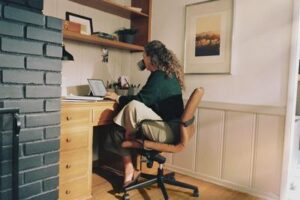
A solid baseline setup looks like this:
- Chair with lumbar support
- Desk height aligned with elbows
- Monitor at eye level
- Natural light + task lamp
- Clear workspace with only essentials
I’ve found that even small tweaks—raising a monitor or clearing cables—can feel surprisingly calm and immediately improve focus. You don’t need perfection. You need function.
Why Your Setup Directly Affects Productivity
You don’t notice a bad setup on day one. But after a week? It becomes quietly exhausting.
According to CDC workplace ergonomics guidance and OSHA workstation recommendations, physical setup directly affects fatigue, posture, and injury risk.
- Posture → energy: Slouching compresses your lungs and reduces oxygen intake, leading to faster mental fatigue.
- Visual clutter → cognitive overload: Too many objects = constant micro-distractions.
- Lighting → eye strain: Poor lighting slows reading speed and causes headaches.
Research referenced by Harvard Health and Mayo Clinic reinforces that poor posture and prolonged sitting contribute to long-term discomfort.
I ignored this early on, thinking productivity was about discipline. It wasn’t. My setup was quietly working against me—and it was frustrating once I realized how much time I’d lost to that.
Essential Components and Budget Ranges
| Component | Recommended Setup | Budget Range |
|---|---|---|
| Chair | Lumbar support, adjustable height | $150–$800 |
| Desk | Height aligned with elbows or adjustable | $120–$600 |
| Monitor | Top at or slightly below eye level | $150–$500 |
| Lighting | Natural + adjustable desk lamp | $30–$200 |
| Accessories | Keyboard, mouse, optional footrest | $20–$200 |
Beyond mid-range gear, the returns shrink fast. A $300 chair often gets you 80% of the benefit of a $1000 one.
Building the Best Home Office Setup for Productivity
1. Ergonomic Foundation
Your chair and desk are the base of everything. If they’re wrong, nothing else compensates.
Use this rule: feet flat, knees at 90°, elbows slightly above desk level. Your screen should meet your eye line—no neck tilt.

2. Layout Strategy
Your work from home office layout should match your behavior. If you’re easily distracted, face a wall—even if it feels less open. That one change improved my focus more than any gadget.
In shared spaces, like a living room, you’ll need compromises. Noise and movement become variables you can’t fully control.
3. Lighting
Natural light is ideal, but glare on screens is a real issue. Place your desk perpendicular to windows when possible.
4. Noise & Distractions
Noise-canceling headphones are one of the highest ROI upgrades for remote work. Not perfect, but very effective.
5. Setup Variations by Work Style
- Deep work: Minimalist home office setup, no clutter
- Calls-heavy: Camera eye level + soft front lighting
- Creative work: Dual monitors or larger desk
- Admin tasks: Simple, compact setup
There’s no universal ideal. I’ve rebuilt my setup three times—and each version taught me what actually mattered for how I work.
Mistakes to Avoid (From Experience)
- Buying a trendy chair that lacked support — I regretted this within a week
- Cable clutter increasing friction and stress
- Buying gear before fixing layout
- Overestimating standing desk usage (they can become expensive static desks)
- Open shelving causing visual distractions
One honest downside: even a perfect setup won’t fix poor habits or constant interruptions. Environment helps—but behavior still matters.
Choosing the Right Setup for Your Situation
| Option | Best For | Trade-offs |
|---|---|---|
| Budget Setup | Entry-level remote workers | Limited adjustability |
| Mid-Range | Most professionals | Best balance of cost and comfort |
| Premium | Long work hours | Diminishing returns |
| Minimalist | Deep focus | Less flexibility |
| Feature-heavy | Creative workflows | Potential clutter |
For deeper guidance:
Step-by-Step Setup Checklist
| Step | Action |
|---|---|
| 1 | Fix chair and posture first |
| 2 | Adjust desk and monitor height |
| 3 | Improve lighting |
| 4 | Reduce clutter and distractions |
| 5 | Add productivity upgrades |
| 6 | Test and refine over one week |
Don’t overhaul everything at once. Incremental upgrades are more practical—and easier to sustain.
FAQs
What’s the best desk for small spaces?
A compact desk with vertical storage or wall-mounted options works best. Focus on depth (at least 24 inches) to maintain ergonomics.
Are standing desks worth it?
They can help, but only if used consistently. Many people use them less than expected.
How much should I spend?
$300–$800 covers a highly effective setup for most people.
Can I be productive without a dedicated room?
Yes—but you’ll need stricter boundaries and layout control to manage distractions.
Final Thoughts
The best home office setup for productivity isn’t about chasing perfection—it’s about removing friction. Comfort, clarity, and focus all come from small, intentional improvements.
Once your setup starts working with you instead of against you, the difference feels immediate. Even the room itself can feel quieter somehow.
Start Improving Your Setup Today
Pick one thing—your chair, lighting, or layout—and fix it today. That single change can make your next workday noticeably better.